
As a freelancer, I've learned that freelancing is both chaos and freedom rolled into one. I'm my own boss, accountant, and even my own motivational coach. Over the years, I've tried countless tools to stay organized and actually get things done. In this article, I'm sharing the apps that have truly helped me boost productivity, manage my time better, and make my workday smoother. Let's take a look at the ones that have earned a permanent spot on my PC or phone.
1. Toggl
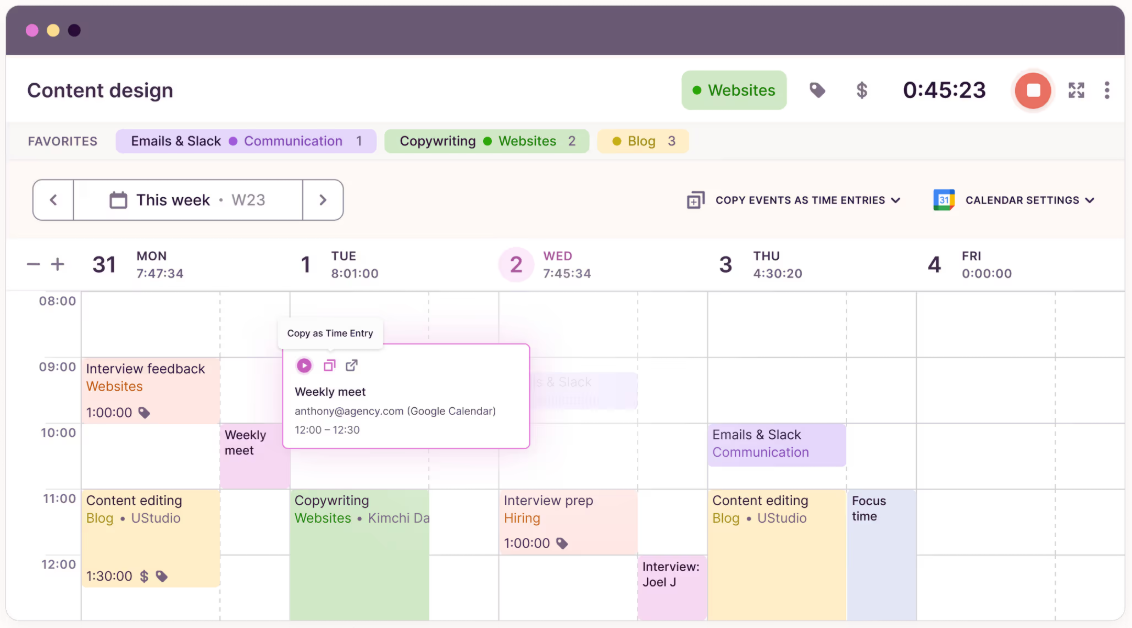
Toggl is the most straightforward time tracker I've used to ensure I get what I want. The free plan is straightforward to use. But once you switch on the paid feature, it could become an accounting and controlling tool for big teams. Browser, desktop, iOS, and Android are supported.
What It Can Do
- Reminds you to start/stop the timer in case you forget.
- Times out automatically according to rules specified beforehand.
- Monitors idle time so that you can subtract it from your logs.
- Permits you to configure the timer according to the Pomodoro technique.
- Includes timer start buttons for Google Chrome and Firefox, Gmail, Trello cards, Google Docs, Notion, Todoist, Evernote, and a hundred more tools.
- Enables manual time logging and conversion of calendar events to time entries.
- Facilitates batch deleting and editing entries.
- Displays time reports within a range of selected dates, divided by projects and clients.
Who It's For
Toggl is suitable for any kind of single freelancer. It's also suitable for small groups that don't want to pay for the application and prefer the free version. However, the paid service can handle task tracking and management even for quite large businesses.
Pricing
Small teams of up to five users with straightforward functionality needs can leverage the software for free with no limitations.
To calculate time cost in dollars, export to XLS, or log time by task, you will require the Starter plan — from $9 per user a month, billed annually. With the Premium plan ($18 a month), you can view profitability charts for employees and projects, send staff email reminders, prevent entries from being edited after a certain period, make time entry fields compulsory, etc.
There is also an Enterprise plan with priority support, which is available individually.
2. Jooble
Jooble is a robust career search engine that I used to seek out gigs and projects anywhere across the globe, even for remote unpaid internship opportunities. Jooble collects ads from many pages on the web, including freelance sites, business firm sites, and niche sites, and consolidates them in a readable list. Jooble is time-saving because it allows you to search for vacancies based on keywords, location, level of experience, and other attributes.

What It Can Do
- Collects employment advertisements from numerous websites and sources in a single location, without surfing through hundreds of websites.
- Allows for exact filtering by keyword, employment type (project, telecommute, full-time), salary, experience, and location.
- Provides subscription email notification of new employment advertisements according to your criteria.
- Can search in multiple languages as well as a country-wide search.
- Provides a simple, easy-to-use interface for accessing via web browser, iOS, and Android apps.
- It lets you bookmark potentially valuable job listings for future use.
Who It's For
Jooble is ideal for freelancers who want to discover new opportunities, increase their client base, or explore the labor market. It is a perfect resource for novices and experienced employees across disciplines — from computer science and design to marketing and writing. The service will also be helpful for professionals interested in labor market trend monitoring and studying projects with variable conditions.
Pricing
Jooble is totally free for candidates. There are no concealed charges or paid plans — everything is available for use immediately after the registration is complete. That makes the service particularly appealing to freelancers who would rather not pay much for job hunting.
Comparison With Alternatives
| Criteria | Jooble | Indeed | Upwork |
| Type | Job aggregator | Job aggregator | Freelance marketplace |
| Search filters | Keywords, location, salary, type of employment | Keywords, location, type of employment | Keywords, project budget |
| Job alerts subscription | Yes, via email | Yes, via email | No, must be checked manually |
| International search | Yes, many countries and languages | Yes, many countries and languages | Yes, focus on freelance projects |
| Cost | Completely free | Free for job seekers | Free with limitations, from $10/month for premium features |
3. SeekFast
As a freelancer, I juggle dozens of client folders and documents, and finding the exact paragraph quickly is essential to my practical work. SeekFast searches inside my documents instantly — with no indexing — so you spend less time hunting and more time shipping work.

What It Can Do
- Search inside documents across folders and subfolders on your computer – no indexing required.
- Works with all popular formats, including Word, Excel, PowerPoint, PDF, OpenOffice, LibreOffice, e-books, text files, source code files, and more.
- Returns ranked results with context snippets so that you can jump straight to the right file and line.
- Quick-open from results; narrow by folder or file type to speed up discovery.
- Runs locally and offline – your files aren't uploaded anywhere.
Who It's For
Freelancers who keep lots of client docs, drafts, specs, or code on their machines and need to retrieve exact passages fast – writers, translators, consultants, paralegals, researchers, developers. Ideal if you prefer native file storage over cloud knowledge bases.
Pricing
Free version available to try the core features. Paid/Pro license with expanded capabilities. Pricing can change – check the official site for current plans.
Tip
Choose SeekFast when you want instant, local, privacy-safe search across many document types without maintaining an index or moving your files into a separate app.
4. Todoist
I've tried many to-do apps, but Todoist is the one that really stuck. It helps me keep track of everything — from client projects to grocery lists — without feeling overwhelmed.. The interface is quite sparse, entirely utilitarian, and free of unnecessary elements (and features). The creators were obsessed with hierarchy and order, leading to Todoist offering an abundance of features for planning tasks and notes.

What It Can Do
- Organize task lists and view them by projects and project sections.
- Set priority and due dates, insert subtasks and comments.
- Label tasks and create filters.
- Display tasks in many formats — by project, due date, label, or filter.
- Create repeating tasks that repeat automatically.
- Invite other members to your workspace and work together as a team.
- Keep track of done tasks and productivity graphs.
- Use to-do lists throughout the web version, desktop, and mobile apps, and a browser extension.
Who It's For
Freelancers and teams whose workflows aren't complex and don't require a Kanban board.
Pricing
Todoist is free with unlimited time. However, its free version lacks convenient features such as reminders, labels, and email support. Pro costs $4 per month, paid yearly, and includes all the mentioned features. A Business plan will cost $6 per user/month (with a yearly payment), allowing you to allocate member and administrator privileges, cover up to 500 projects per project, and include up to 50 collaborators.
5. Asana
I use Asana for several types of tasks: project and task management, document and information sharing, and tracking lists. To be more precise, Asana dashboards will differ for a team of site developers, an independent designer, and a remote technology expert. Work may be presented in the form of lists, Kanban boards, or as a graphical timeline, say. It is quite a graphic presentation compared to bare lists when several people are working on a project, and one project relies on the end product of another.

What It Can Do
- Attach files and comments to tasks, give subtasks, and have task deadlines.
- Plan Views - in calendar view, you can see plans and subplans, along with their tasks and subtasks.
- Instruct on new tasks such as transferring a task back and forth between projects, setting deadlines, establishing priorities, assigning tasks to assignees, etc.
- Prepare info forms on, but not limited to, approval of tasks and other recurring processes.
- Both display the status of all projects on a single screen and the individual statistics for each project.
- On one page, you can find out what is being done by whom and how it is going.
- Make Gmail, Slack, Google Sheets, Google Calendar, Google Drive, Dropbox, and 100 or more other apps and services interact with Ganttify and Jotboard - they (along with many others) can all be connected.
- Collaborate on tasks in web app and mobile apps for iOS and Android.
Who It's For
The minimalism of its appearance is attractive, but perhaps Asana is slightly overdesigned to appeal to individual freelancers. This is why, as it appears to me, the service best suits group work, that is, either a limited number of freelancers collaborating or a company with employees spread across the globe.
Pricing
The freemium version of Asana is modest, offering enough elbow room for a freelancer or a small office of up to 15 people. They resolve membership subscriptions at $10.99/user/month (annually billed premium plan). They also offer a business plan at $24.99/user/month, as well as the Asana Enterprise plan, whose pricing can be negotiated on a one-on-one basis. Each of them adds features to their predecessor (check the timeline view, custom field, unlimited tasks, and the custom rule builder; all of these are only available with a paid subscription).
6. Forest
I've struggled with staying focused for long stretches, and Forest turned out to be the perfect little motivator. Watching those trees grow as I focus reminds me how much time I can reclaim when I'm really present. It also prevents smartphone and social media addiction by managing the time I spend on various applications. The app is played under the principles of gamification. Whenever you want to concentrate and avoid phone distraction, you must plant a tree. Although you don't open other apps, the tree develops; if you do, the tree will be destroyed.

What It Can Do
- Set the period when your tree will flourish (when you would prefer not to be distracted by your phone) — up to 120 minutes.
- Select which tree you would prefer to cultivate more.
- Define one of the default labels for each tree — entertainment, rest, social, study, work (and in Pro, you can define your own).
- In the browser extension, define a list of sites not to visit while working or studying.
- Allocate a group of exceptions in the smartphone app — programs that will not "kill" the tree upon launch.
- Plant trees with friends — when one tree gets destroyed, they will all get destroyed.
- Look at statistics and success rates by tag and time interval.
- See your victories compared to friends.
- Look at your "forest" and "planting" past.
- Sync app data to many devices.
Pricing
The advertisement-free option is enough to concentrate on the task at hand and build a productive habit. The Pro version, available for approximately $4, unlocks additional features: exception list creation for phone apps, planting a forest with colleagues, custom tag creation, sharing victories with friends, and syncing data across devices.
7. Notion
Notion is a multi-purpose tool I use in more than one way, e.g., as a knowledge base. When Trello is a kit of blocks, which you construct your system of, Notion is soft material, on which you build the blocks. The term all-in-one is a concise characterization of the tool's nature.

What It Can Do
- Organize notebook sections, filters, and tags, and arrange documents, templates, and notes accordingly.
- Share with colleagues, clients, and team members.
- Work in the browser and in Windows, macOS, iOS, and Android apps.
- Format entries with headings, lists, and fonts.
- Add tables, interactive checklists, images, videos, Figma projects, and more.
- Customize your knowledge base interface from templates or from scratch.
Pricing
A basic one is simple but quite good at organizing links, templates, and documents. The individual user paid plan costs $4 a month. In the paid version, you can upload unlimited files, provide unlimited guest access, and view version history. The team would cost $8 per user per month.
Final Thoughts
That's it in a nutshell. Just one more thing — don't abuse it. Software and tools are great: they make life fun and work effective. But too many of them will end up taking more time off your hands than you save. Balance it yourself: pick 2 or 3 that you enjoy and that fit you best, and you will be good.
